Gus, your WordPress engineer
Most AI tools tell you what might be wrong. Gus works on your real sites: it finds the cause, prepares the fix, tests it on staging and applies it when you approve, with a backup, verification and automatic rollback.
Gus is on every plan, from $2.99 a month, with a 7-day trial.
- Your approval
- Staging or production, your choice
- A backup
- Verification
- Automatic rollback
What Gus sees
It looks at how your site is actually built
Through the MaintainHQ connector plugin, Gus reads your site the way a senior WordPress developer would, before it suggests anything.
Your stack
Theme and templates
Advanced Custom Fields
Page builders
Database, read-only
Profiling
Screenshots
Logs and history
What Gus does
It fixes, not just tells you
Every change goes through the same pipeline: your approval, staging or production as you choose, a backup, verification and automatic rollback.
Diagnoses and fixes, safely
Gus finds the cause and prepares the fix. It waits for your approval, runs on staging or production as you choose for that fix, takes a backup, checks the site afterwards and rolls back automatically if anything got worse.
Writes code to WordPress standards
Small changes in your child theme or a site-specific plugin, checked against the WordPress Coding Standards and PHP compatibility for your PHP version, with security checks for nonces and permissions. You see the diff before anything is applied.
Builds features, pages and shortcodes
Gus can write the code for a feature, create the page for it (as a draft by default) and add a shortcode or block to an existing page, all in one plan you approve. Code goes first, then the page.
Tests updates before they go live
Before a risky plugin update reaches your live site, Gus reads the changelog, finds theme code that depends on the plugin, rehearses the update on staging and gives a verdict. Risky updates wait for you. On by default on Pro and Agency.
Incident response
When a site goes down or throws a fatal error, Gus runs the right checks straight away, drafts a fix and the status page wording, and sends you one alert. Approve the fix from Slack with one button. On by default on Pro and Agency.
Answers questions about your whole fleet
Ask across every site at once: which sites run an affected plugin version, which are slowest, which have known vulnerabilities, what updates are waiting.
Change receipts
Every change has a receipt: what changed and why, who approved it, the backup, the checks and the outcome. Share it with your client through a signed link that expires.
Bigger jobs
Plans the work, and shows you the plan
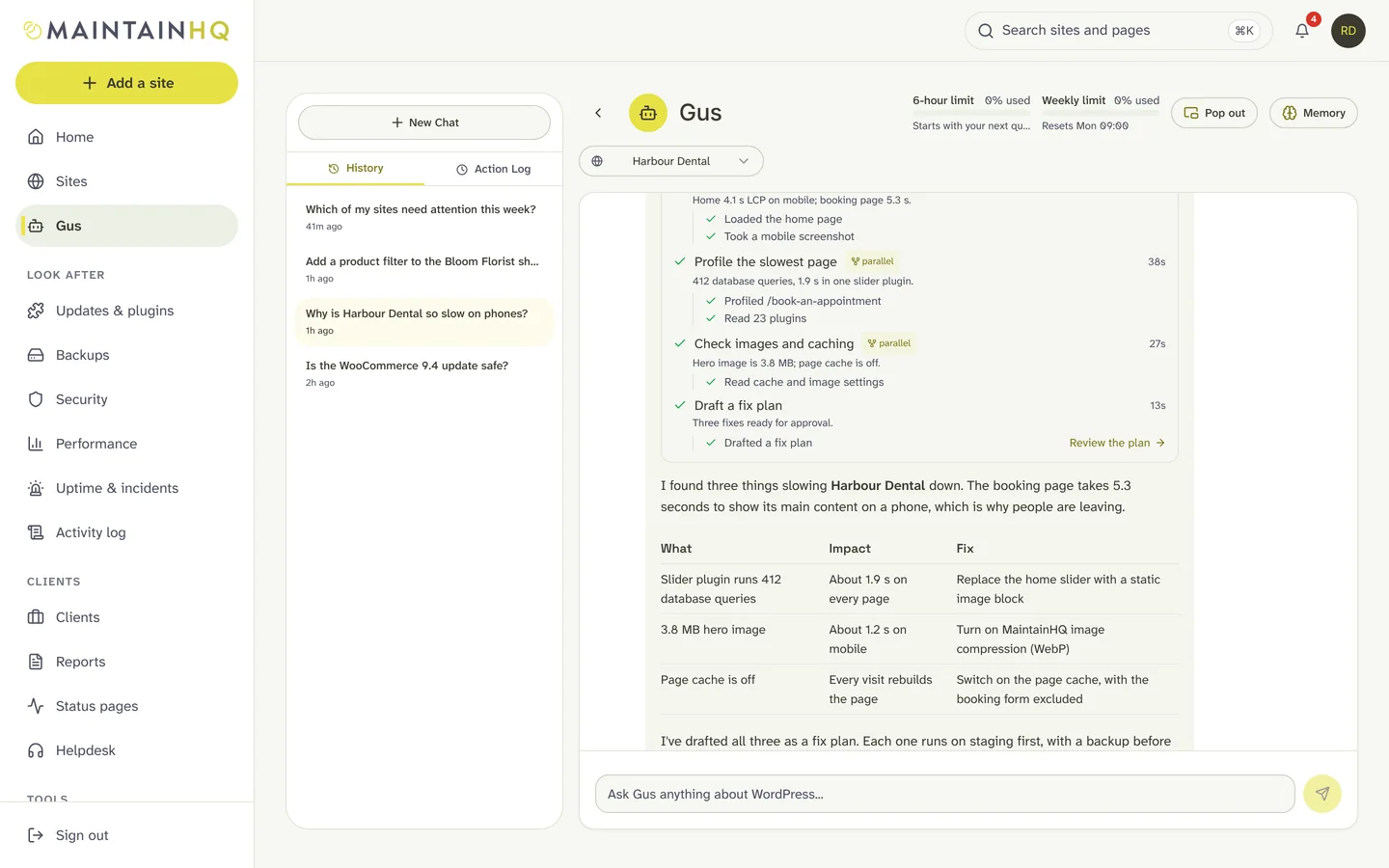
For anything with several steps, Gus breaks the job into tasks and keeps you up to date as it goes.
The task card
A live card shows the plan: each task with its status, the steps Gus took inside it, a progress bar and the time taken. It is saved with the answer, so you can come back to it later.
Parallel helpers that only read
Independent investigations, such as reading several theme files or checking plugins and the database, run side by side as helpers, up to three at once. Helpers can only read. Every change stays with Gus and goes through your approval.
Where you can ask
Ask Gus wherever you work
The dashboard
Chat with Gus about one site or your whole fleet, with plans, task cards and fixes to approve.
WordPress admin
Administrators get a Gus menu inside WordPress on every connected site.
Slack
Ask with /gus, and approve incident fixes with buttons in the alert.
API and MCP
Ask Gus from your own tools or AI assistant. Gus is read-only there; fixes still need approval in MaintainHQ.
Memory
Gus remembers your sites, and you
Gus keeps notes on each site: how it is built, what you prefer for it (“staging first for every change”) and what happened before. It also remembers you: your business, how you like to work and what you are aiming for, across all your sites. It can look back at earlier conversations too.
You can read, pin, edit and delete every memory. Anything that looks like a password or key is stripped before it is saved.
Safety
Nothing changes without your approval
More on the guardrails in How Gus works and Security & trust.
- Nothing changes on a site without an approval: in the dashboard, by a signed email link, or by a linked Slack user who may change that site.
- Every fix needs a person to approve it, including any code Gus writes, and you choose staging or production each time.
- Pages built with a page builder are protected: Gus will not edit them, and tells you to use the builder’s own shortcode widget or a new standard page.
- An edit is refused if the page changed since Gus read it, or if it would remove or reorder existing blocks.
- Every change has a backup first, is verified afterwards and rolls back automatically, including when new code causes a PHP error.
- In chat, Gus only reads and drafts; changes happen through the approved pipeline. Core files, plugins, wp-config.php and .htaccess are off limits for code changes.
Usage
Gus is on every plan
Your allowance resets every 6 hours, with a weekly allowance, and bigger plans include more. A running answer is never cut off.
Starter
Gus usage: 20% of Starter Plus
Resets every 6 hours, with a weekly allowance
Roughly 4 quick questions every 6 hours, 14 a week (estimate)
Starter Plus
Gus usage: standard allowance
Resets every 6 hours, with a weekly allowance
Roughly 20 quick questions every 6 hours, 70 a week (estimate)
Pro
Gus usage: 4x Starter Plus
Resets every 6 hours, with a weekly allowance
Roughly 80 quick questions every 6 hours, 280 a week (estimate)
Agency
Gus usage: 12x Starter Plus
Resets every 6 hours, with a weekly allowance
Roughly 240 quick questions every 6 hours, 1,000 a week (estimate)
How Gus usage works: the two allowances, when they reset and what uses more.
Proof
Measured, not promised
The Gus benchmark
Ten broken WordPress sites, each a failure we see on real client sites, graded automatically on root cause, fix and fix safety. Latest published run: root cause found on 8 of 10 sites.
Hear when Gus learns something new
New Gus skills, benchmark results and WordPress maintenance tips by email. Roughly once a month, and you can unsubscribe at any time.
Hear when Gus learns something new
New Gus skills, benchmark results and WordPress maintenance tips by email. Roughly once a month, and you can unsubscribe at any time.
Frequently asked questions
What agencies ask before they let Gus near a client site.
Is Gus just a chatbot?
Will Gus change my site without asking?
What happens if a fix makes things worse?
Does Gus work with Elementor and other page builders?
Do I need a staging site?
Which plans include Gus?
What does Gus need on my site?
Put Gus on your sites
Connect your first site in minutes and let Gus run a health check. Plans start at $2.99 a month, with a 7-day trial.